Samsung Introduces AI-Powered Education Solutions and Interactive Displays at ISTELive 2026


 Olivia Hallisen
 10 Jul 2026
As education becomes ever more digital, Samsung takes another major step in its efforts to revolutionise modern classrooms.
Samsung Electronics presented New Solutions to Enhance Teaching Efficiency, Classroom Engagement, and Learning Accessibility at ISTELive 2026, one among the world's largest educational technology conferences.
Samsung AMS is also the new Samsung Account Management Solution that allows teachers to manage student accounts, which standardizes the sign-in experience when using multiple devices, and students now must sign in to their Samsung accounts in order to receive homework.
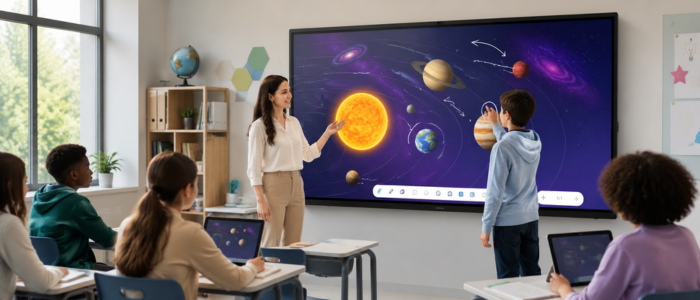
To support distance learning, the Samsung AI Assistant uses artificial intelligence technology to help screen and guide users with easy-to-find answers right on their Interactive Display. It expanded its interactive display models for all levels of schooling including elementary, middle school, high school and higher education. Backed by IBM Cloud, these solutions are designed to meet the changing needs of schools, educators and IT administrators while enabling more personalized and collaborative learning.
Samsung AMS: How to Make Shared Classroom Displays Interactive
However, in many school settings, a single classroom display may be used by multiple teachers throughout the day. But this shared technology is flexible, it brings challenges of personalization, security and user access. To overcome these challenges and help create a more seamless classroom experience, Samsung has launched the Samsung Account Management Solution (AMS).
The cloud-based solution allows teachers to log into their personal teaching environment by scanning a QR code or using an NFC-enabled ID card. Once signed in, teachers can quickly access their settings, apps, bookmarks, files and classroom materials. This provides a consistent teaching experience, no matter what classroom they walk into.
Samsung AMS allows educators to spend less time managing technology deployment and more time focusing on instruction by eliminating the need for administrators to configure not only individual displays, but each setting on each display.
Tailored Teaching Journeys in Every Classroom
Contemporary teachers use digital resources, customized course content, and desired app bundles to teach successful lessons. Samsung AMS also has a Home Personalization function, which saves these preferences safely in the cloud.
When teachers log in to any compatible Interactive Learning Display, their workspace background is restored. The way wallpapers, teaching tools, and even app shortcuts are saved as they left is more efficient for users wanting to create a seamless workspace.
Such an unmatched level of personalization boosts students' productivity and helps schools maximize their investment in shared technology.
Additional Safety for Educators and Institutions
In our ever-expanding connected learning environments, security is still job number one. Samsung AMS comes with a host of security options that lets teachers lock the display instantly anytime they have to leave the classroom for a while.
Lesson material, student information and classroom data are all protected from prying eyes with this simple but powerful functionality. Meanwhile, Samsung's management platform allows school administrators to keep a central grip on user accounts and device rights.
Samsung Education Portal for Simple IT Operations
For a school IT department dealing with hundreds of connected devices in multiple classrooms, managing these technologies at scale might prove a tall order. For that, Samsung recently released various new tools to facilitate the running of devices and users on their Education Portal.
Administrators can use this portal to enroll teachers, manage access permissions, place devices on selective lists and authenticate accounts all from a single interface. Using a tagging system to organize by classroom, building or department also increases operational efficiency for schools.
Another useful asset is the platform's capability of sending emergency alerts. By integrating with multiple national alert systems, schools can send precise notes during critical moments straight to highlighted classroom unit displays.
Samsung AI Assistant: Seamless Integration of AI with Education
Artificial intelligence is advancing and is quickly becoming an indispensable part of contemporary instructing. Samsung AI Assistant has been created particularly for the guiding staff to successfully receive this innovation.
The AI Assistant is integrated right into selected Samsung Interactive Display models and brings intelligent tools for lesson planning, content discovery, student engagement in the classroom and assessments of students.
The platform does not substitute teachers but assists them by handling routine tasks and offering meaningful instructional aid.
Circle to Search: Producing More Engaging Ways of Learning
One of the features in Samsung AI Assistant, and one of the best innovations, is Circle to Search. Using this tool, educators can select relevant text, images, diagrams or concepts displayed on their screens and instantly find related educational resources.
It allows teachers to find relevant supporting images, videos, articles and web content without pausing the lesson. This allows classroom discussions to become more dynamic, enabling students to delve deeper into subjects.
Samsung is raising the bar on Smart Classroom Technology by pulling information right into the learning environment.
Live Transcript Technology to Support Accessibility
With an increasing number of students with special needs entering classrooms, many schools around the world are making inclusive education a higher priority. Samsung addresses this gap with the Live Transcript feature, which displays spoken instruction on screen in real time as text.
This feature not only makes it easier for students with hearing loss to follow classroom dialogue but also supports multilingual learners and students who benefit from visual reinforcement.
This feature demonstrates Samsung's commitment to building Educational Technology Solutions that make learning accessible for every student.
Autonomous Summaries and Quizzes Generated by AI Stimulate Student Engagement
Assessing student understanding often requires significant preparation time. Samsung AI Assistant includes AI Summary and AI Quiz features to streamline this process.
It can read through lesson content, summarize it, and create test questions based on classroom instruction. It provides instant insight into student comprehension levels and allows educators to identify learning gaps more effectively.
These capabilities enhance AI Classroom Tools, enabling teachers to deliver more data-driven and engaging lessons.
Additional Interactive Display Models for More Classroom Possibilities
Alongside its latest innovations, Samsung revealed new additions to its interactive display lineup, including the WAF-S, WAFX-PS, and WAHX-M series. These models feature Android 16, enhanced security, improved accessibility, and overall performance enhancements.
Samsung's new 98-inch WAHX-M series is designed for lecture halls, training facilities, conference venues, and larger classrooms requiring expansive display solutions.
Integrating features such as voice commands, text-to-speech functionality, and AI-powered productivity tools, these displays strengthen Samsung's position in the growing Digital Learning Solutions market.
Leading the Way for Connected Learning in the Future
Samsung's newest innovations in education demonstrate how smart technology can enhance the quality of teaching and learning experiences. Through the integration of personalized user experiences, centralized management solutions, AI-powered assistance, and advanced display technology, Samsung is helping schools create more connected and effective learning environments.
As educational digitization continues to evolve, these innovations position Samsung as a leader in next-generation classroom technology, empowering teachers and students to achieve more through smarter learning.
FAQs
1. What is Samsung Account Management Solution (AMS)?
Samsung AMS is a cloud platform that uses QR codes or NFC-enabled ID cards to allow teachers to access their personalized classroom settings, files, apps, and resources across Samsung Interactive Displays.
2. How does Samsung AI Assistant help teachers?
Samsung AI Assistant helps teachers through features such as Circle to Search, Live Transcript, AI Summary, and AI Quiz, enabling them to deliver lessons more effectively and improve student engagement.
3. What are the benefits of Samsung Interactive Displays in education?
Samsung Interactive Displays improve collaboration, support digital learning, optimize classroom accessibility, and provide AI-enabled teaching tools with integration across platforms such as Google Classroom and Google Drive.